
Best Computer for Day Trading 2026
A trading computer does not need to be an extreme gaming PC. What matters is having enough processing power, memory, fast storage and display support to run your trading platform, charts, scanners and browser reliably throughout the trading day.

Why Your Trading Computer Matters
Day trading can involve running several applications at once: trading software, multiple charts, scanners, news feeds, a browser and potentially several monitors.
A computer that struggles under that workload can become slow or unresponsive at exactly the wrong moment. That does not mean you need the most expensive machine available — it means the computer should comfortably handle the software and number of screens you actually intend to use.
Desktop vs Laptop for Trading
Both desktops and laptops can make capable trading computers. The better choice depends mainly on whether you prioritise performance and expandability or portability.
Desktop Trading Computer
- More performance for the money.
- Easier to upgrade RAM, storage and other components.
- Generally easier to connect several monitors.
- Better suited to a permanent multi-screen workstation.
- Usually offers better cooling during long sessions.
Laptop Trading Computer
- Portable and suitable for trading away from a desk.
- Can connect to external monitors at home.
- Modern laptops can comfortably run typical trading software.
- Less upgradeable than most desktop PCs.
- Display outputs should be checked before buying.
If your trading takes place almost entirely from one desk and you want several monitors, a desktop usually provides the simplest route. If you regularly travel or work from different locations, a laptop may make more sense.
What Level of Trading Computer Do You Need?
The right specification depends more on your workload than on whether a computer is marketed as a “trading PC”.
Starter Setup
Suitable for learning, charting and running a normal trading platform alongside a browser.
- Memory 16GB RAM
- Processor Modern mid-range CPU
- Storage 512GB SSD or larger
- Displays 1–2 monitors
- Graphics Integrated graphics may be sufficient
Active Trader
A sensible target for heavier charting, scanners, several applications and a multi-monitor workspace.
- Memory 32GB RAM
- Processor Strong modern multi-core CPU
- Storage 1TB NVMe SSD
- Displays 2–4 monitors
- Graphics Appropriate multi-display support
Heavy Workstation
For traders running numerous applications, extensive charting, very large workspaces or many displays.
- Memory 32–64GB+ RAM
- Processor High-performance modern CPU
- Storage 1TB+ fast NVMe storage
- Displays 4+ monitors where required
- Graphics Dedicated or specialist multi-display solution
Recommended Specs for a Trading Computer
For a new trading computer in 2026, the following provides a useful starting point. Requirements can vary considerably between trading platforms, so always check the software you intend to use before buying hardware.
| Component | Good Starting Point | Heavier Trading Setup |
|---|---|---|
| CPU | Modern mid-range processor | Higher-performance modern processor |
| RAM | 16GB | 32GB or more |
| Storage | 512GB SSD | 1TB+ NVMe SSD |
| Graphics | Integrated graphics can be sufficient for a simple setup | Dedicated or multi-display graphics where needed |
| Monitors | 1–2 | 2–4+ depending on workflow |
| Network | Stable broadband connection | Wired Ethernet where practical, with backup connectivity worth considering |
| Operating System | A current operating system supported by your broker and trading software | |
CPU, RAM, Storage & Graphics
A balanced computer is usually more useful than spending most of the budget on one headline component.
Processor — CPU
The processor handles calculations and much of the work performed by trading platforms, browsers and charting applications. A recent mid-range processor is sufficient for many setups; heavier workloads benefit from additional performance.
Memory — RAM
RAM becomes important when several applications, browser tabs, scanners and charts are open simultaneously. 16GB is a practical starting point, while 32GB provides more headroom for heavier multitasking.
Storage — SSD
An SSD should be preferred to an old mechanical hard drive for the main system disk. Fast solid-state storage improves boot times, application loading and general system responsiveness.
Graphics — GPU
Trading itself is generally not a graphics-intensive task. The important question is whether the computer can support your required number and resolution of monitors. A powerful gaming GPU is unnecessary for many traders.
How Many Monitors Do You Need for Day Trading?
Multiple monitors can make it easier to keep charts, scanners, order entry and news visible at the same time, but more screens do not automatically make someone a better trader.
A beginner may be perfectly comfortable with one large display or a two-monitor setup. Traders who genuinely need several charts and applications visible simultaneously may prefer three or four.
What Should You Prioritise?
Trading Computer Brands to Consider
You do not need to buy a computer specifically marketed for traders. Mainstream business and performance PCs can work just as well when configured with suitable components. However, specialist trading-PC manufacturers are another option if you want a system designed around a demanding multi-monitor workstation.
Falcon Trading Systems
Falcon specialises in purpose-built trading computers for traders who want a dedicated workstation, including systems designed around demanding multi-monitor setups. A specialist system can be convenient if you want the computer configured specifically for this type of workload, although it may cost more than an equivalent mainstream PC.
View Falcon Trading Computers →Lenovo
ThinkPad laptops and ThinkCentre desktops can be practical choices for traders who value business-oriented hardware and straightforward workstation setups.
Dell
Dell business and performance ranges provide numerous desktop and laptop configurations suitable for single or multi-monitor trading setups.
Apple
Mac computers can provide strong performance, but check that your broker, trading platform and any specialist tools you use support macOS before choosing one.
Upgrade Your Existing Computer or Buy New?
If your current computer is generally reliable, replacing the entire machine may not be necessary.
Depending on the system, relatively simple upgrades can sometimes provide a noticeable improvement.
- Increasing RAM can help if the computer slows down when several programs are open.
- Replacing an old mechanical drive with an SSD can transform the responsiveness of an older system.
- A suitable graphics solution or dock may provide the additional display outputs required for a multi-monitor setup.
- Cleaning unnecessary background software can reduce resource usage without buying any new hardware.
If the processor is very old, the system cannot run a supported operating system, or several components would need replacing, a new computer may make more sense than repeatedly upgrading the old one.
What Does a Real Trading Setup Look Like?
There is no single correct trading desk. Some traders use several screens, while others prefer a much simpler workspace.
The examples below show different approaches to a home trading setup.
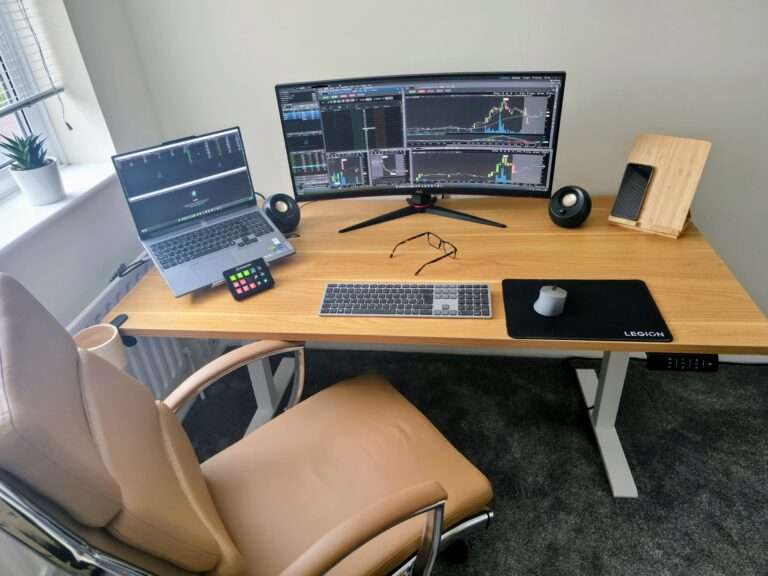
Inside My Home Day Trading Setup
Want to see what I actually use? Take a closer look at my current home trading workstation, including the computer, monitor, Thinkorswim setup, Stream Deck and the connectivity I use for trading.
See My Home Trading Setup →Final Thoughts
The best computer for day trading is not necessarily the most expensive one. It is the computer that can comfortably run your trading software, charts, scanners and displays without becoming a distraction.
For many traders, a modern computer with 16GB of RAM, an SSD and support for one or two monitors may be enough. A heavier multi-application or multi-monitor setup can justify 32GB of RAM, more processing power and additional display capability.
Start with what your actual workflow requires. You can always add memory, storage or monitors later if your trading setup becomes more demanding.
This content is provided for educational and informational purposes only and does not constitute financial, investment or trading advice. Trading involves risk, and you can lose some or all of the money you commit to a trade.
